WordPress is the go-to Content Management System (CMS) for building websites and blogs, powering over 40% of the web. Its flexibility, ease of use, and extensive features make it an excellent choice for beginners and seasoned developers alike. At Netzila Technologies, our expert WordPress developers are dedicated to helping you make the most of this powerful platform.
In this guide, we’ll share essential tips and tricks to help beginners master WordPress efficiently, empowering you to create stunning, high-performing websites.
Understanding the Fundamentals of WordPress
Before diving into WordPress, it’s crucial to understand its core components: the WordPress software and themes.

- WordPress Software: This is the backbone of your site, managing your content and organizing it on the front end. It allows you to create, edit, and manage posts, pages, and media, making it the heart of your website.
- WordPress Themes: Themes dictate the look and feel of your site, providing pre-designed templates that you can customize to fit your brand. Choosing the right theme is key to creating a visually appealing and user-friendly website.
Setting Up Your WordPress Website: Step-by-Step Guide
- Choose a Hosting Provider and Domain Name: A reliable hosting provider ensures your website is fast, secure, and always accessible. Consider trusted options like Bluehost, SiteGround, or DreamHost.
- Install WordPress: Most hosting providers offer one-click WordPress installation, simplifying the setup process. Once installed, log into your WordPress dashboard to start managing your site.
- Secure Your Website: Implement basic security practices immediately, such as installing an SSL certificate, using strong passwords, and setting up two-factor authentication.
Choosing and Customizing the Perfect Theme
Selecting a theme is about more than aesthetics; it’s about functionality and user experience.
- Free vs. Premium Themes: Free themes are great for beginners, but premium themes often offer more customization options, advanced features, and dedicated support.
- Customization Tips: Modify your theme to align with your brand by changing colors, fonts, and layouts. Use the WordPress Customizer to tweak the header, footer, and add your logo, ensuring your site is uniquely yours.
Creating and Organizing Content in WordPress
Creating content in WordPress is simple, but organizing it effectively can enhance the user experience.
- Creating Posts: Navigate to the Posts section in your dashboard, click “Add New,” and start writing. Use the block editor to format your content and add images or other media elements.
- Categories and Tags: Use categories for broader content organization and tags for specific keywords, making it easier for visitors to navigate your site.
SEO Optimization for WordPress: Boost Your Visibility
Search Engine Optimization (SEO) is vital for driving organic traffic to your website.
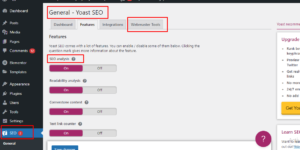
- Essential SEO Plugins: Use Yoast SEO or All in One SEO Pack to optimize your posts with meta titles, descriptions, and focus keywords. These plugins also provide readability and SEO analysis to guide content creation.
- Optimizing Images: Compress images to improve load times and add alt text for better search engine indexing.
Integrating Social Media for Enhanced Engagement
Integrate social media to amplify your content’s reach and connect with your audience.
- Social Sharing Plugins: Add social sharing buttons to your posts using plugins like Social Warfare or Monarch. These encourage readers to share your content on their social networks, driving more traffic to your site.
Extending Website Functionality with WordPress Plugins
Plugins are the secret sauce of WordPress, enabling you to add virtually any feature you can imagine.
- Essential Plugins: Popular plugins like Elementor (page builder), WooCommerce (eCommerce), and WPForms (form builder) can dramatically enhance your website’s capabilities.
- Plugin Management: Regularly update plugins to maintain security and performance, and always check compatibility with your WordPress version.
Securing Your WordPress Site with Best Practices
Security is a top priority for any website owner.
- Security Plugins: Use Sucuri Security or Wordfence to protect your site from malware, hackers, and other threats. These plugins offer firewall protection, security scanning, and login attempt monitoring.
Optimizing Website Performance for a Better User Experience
Performance is a key factor in user satisfaction and SEO rankings.
- Speed Optimization Techniques: Implement caching with plugins like W3 Total Cache, optimize images, and minimize CSS/JS files. Additionally, using a Content Delivery Network (CDN) like Cloudflare can significantly boost your site’s speed.
Managing Comments and Engaging with Your Audience
Comments foster community engagement and can drive repeat visits.
- Spam Protection: Use Akismet to filter out spam comments and keep your discussion section clean and valuable for real users.
Regular Backups: Protecting Your Data
Backups are your safety net against data loss.
- Backup Plugins: Use UpdraftPlus or BackupBuddy to schedule automatic backups of your site’s files and database. Always store backups in a secure location, such as an external cloud service.
Frequently Asked Questions (FAQs)
1. How do I choose the best WordPress theme for my website?
Choose a theme that matches your brand, is mobile-responsive, and supports the plugins you plan to use. Premium themes often provide better support and customization options.
2. What are the must-have plugins for a WordPress site?
Some essential plugins include Yoast SEO for optimization, WPForms for contact forms, and Wordfence for security.
3. How can I improve my website’s loading speed?
Use caching plugins, optimize images, and consider using a CDN. Regularly updating your themes and plugins also helps maintain performance.
4. How often should I back up my WordPress site?
It’s recommended to back up your website weekly, or daily if you frequently update content. Use plugins like UpdraftPlus to automate this process.
5. What’s the best way to secure my WordPress site?
Ensure your WordPress installation, themes, and plugins are always updated. Use security plugins, enable two-factor authentication, and use strong, unique passwords.
Conclusion
Mastering WordPress is an ongoing journey, but by understanding the basics, choosing the right tools, and optimizing your site, you can create a stunning online presence. At Netzila Technologies, our team of expert WordPress developers is here to help you every step of the way. Experiment, learn, and take control of your website’s potential.
Ready to elevate your WordPress site? Contact Netzila Technologies today and let’s build something amazing together!